
I am sharing with you this project to show you how to interface with This OLED LCD. The LCD interface with the MCU STM32F4 via SPI. The LCD has a total of 20 pins and it is connected to the MCU based on the diagram shown below:
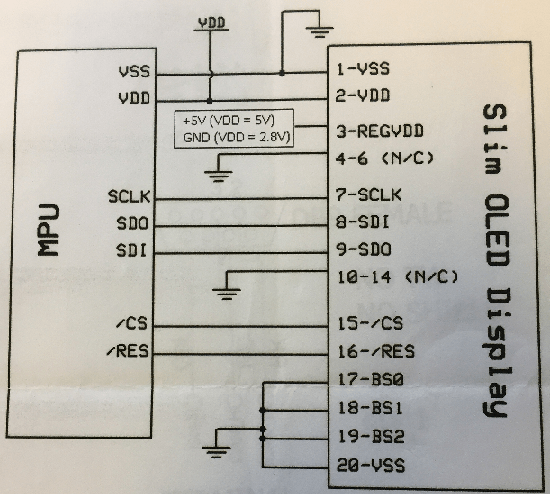 Figure1. LCD Pins connections with the MCU
LCD Initialization
The LCD is initialized using the function below:
/* Initialize LCD  */
void LCD_Init(void)
{
GPIOI->ODR |= GPIO_ODR_ODR_5; //Reset line is always set high

command(0x2A); //function set (extended command set)
command(0x71); //function selection A

data(0x00); // disable internal VDD regulator (2.8V I/O). data(0x5C) = enable regulator (5V I/O)
command(0x28); //function set (fundamental command set)
command(0x08); //display off, cursor off, blink off
command(0x2A); //function set (extended command set)
command(0x79); //OLED command set enabled
command(0xD5); //set display clock divide ratio/oscillator frequency
command(0x70); //set display clock divide ratio/oscillator frequency
command(0x78); //OLED command set disabled
command(0x09); //extended function set (4-lines)
command(0x06); //COM SEG direction
command(0x72); //function selection B
data(0x00);    //ROM CGRAM selection

command(0x2A); //function set (extended command set)
command(0x79); //OLED command set enabled
command(0xDA); //set SEG pins hardware configuration
command(0x10); //set SEG pins hardware configuration
command(0xDC); //function selection C
command(0x00); //function selection C
command(0x81); //set contrast control
command(0x7F); //set contrast control
command(0xD9); //set phase length
command(0xF1); //set phase length
command(0xDB); //set VCOMH deselect level
command(0x40); //set VCOMH deselect level
command(0x78); //OLED command set disabled
command(0x28); //function set (fundamental command set)
command(0x01); //clear display
command(0x80); //set DDRAM address to 0x00
command(0x0C); //display ON

HAL_Delay(5);
}
Sending a String to the LCD via SPI
Based on the SPI interface requirements described in the LCD data sheet, in order to send one byte of data to the LCD, we need to send 3 bytes over the SPI. We first divide each byte in a string into three bytes: Byte1 is always 0x5F, and second byte is least significant nibble of the string byte and third byte is the most significant byte of the string byte. For example we need to write letter “E”, we send the following three bytes successively: 0x5F, 0x04, and 0x05. Note that the hexadecimal value for character “E” is: 0x45.
Also it is important that before you send the SPI data, you need to deselect the CS line ( chip select pin need to be pulled low.) Afterwards, we need to wait for the SPI to become ready.
/* write data to the LCD */
void data(uint8_t i)
{
uint8_t DataArray[3]={0};

DataArray[0]=0x5F;
DataArray[1]=i &(0x0F);
DataArray[2]=(i &(0xF0))>>4;

GPIOI->ODR &= ~GPIO_ODR_ODR_5; //chip select active low

while (HAL_SPI_GetState(&Spi2Handle) != HAL_SPI_STATE_READY){}

HAL_SPI_Transmit(&Spi2Handle, DataArray,3, 1000);

while (HAL_SPI_GetState(&Spi2Handle) != HAL_SPI_STATE_READY){}

GPIOI->ODR |= GPIO_ODR_ODR_5; // de-assert chip select
}
If we need to write a number to the LCD we do it as shown in the function below
/**
* Dispaly a string to the LCD
*/
void LCD_I2COutput(uint8_t*aRxBuffer)
{
   int i;
   command(0x01); //clear display
   command(0x02); //return home
   while(*aRxBuffer!=NULL)
   {
    data((0x30) |(*aRxBuffer));
    aRxBuffer++;
  }
}
The figure below is a display of a string on the LCD:
 Figure2. LCD Display
Below is how the functions are called from inside main function. If you need access to the project files, you download it from my Github repository here.
int main(void)
{
/*initialize the HAL Library */
HAL_Init();

/*System Clock Config */
SystemClock_Config();

/*SPI Config */
SPI2_Config();
SPI_CS_RS_Config();

/*NHD-0420CW-AB3 LCD Config */
LCD_Init();

LCD_Output();
}
I hope you enjoyed this tutorial and if you like it and learned something from it, don’t forget to give us your feedback.
References:
1. https://www.newhavendisplay.com/nhd0420cwab3-p-8038.html
 Embedded Design