
This project is about controlling the light of a string of eight RGB leds, connected in series. The LEDs are from Everlight Electronics, part# 19-C47/RSGHBHC-5V01/2T. Each LED can have a unique RGB color represented by an RGB digital value. More details about these LEDs and the timing requirements to lit them are in the datasheet.
In order to turn on these LEDs, we need to generate a train of pulses that follow the timing requirements below, as per the datasheet. The data will be sent on the MOSI line, and it will be clocked with the SPI CLK. Usually these LEDs are driven using a PWM signal with a certain frequency and two different duty cycles: one for bit 1, and one for bit 0, and the bits data packet would look like a train of PWM pulses of different duty cycles. But this time, I am exploring the option of using SPI to turns these LEDs on. In my next post, I will show you how to use PWM to control the lighting of these LEDs.
Again this project was implemented on iMX RT1060, using this development board.
Timing Requirements
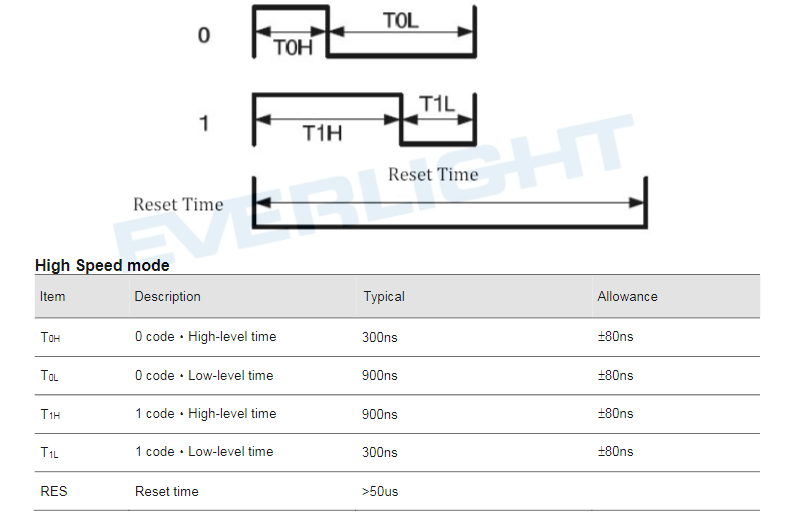 Figure1. Timings waveform and Requirements
First, let’s remind ourselves how an RGB color is represented digitally. An RGB color is represented with three bytes, each byte per channel: one byte for red, one byte for green and last byte for blue color, making a total of 24 bits. The MSB byte is read and LSB byte is blue color.
Now, back to the waveform and table above. These sources of information tells us that for each bit of the 24 bits of data needs a pulse whose period is 1200ns, and for bit 1, we need a PWM duty cycle of 75% (900/1200), and for bit 0 we need a PWM duty cycle of 25% (300/1200).
Since, I am not using PWM in this project to turn on these LEDs, which I will leave for next time, I need to find a way how to represent these 24 color bits with SPI data that I can send on the MOSI line from the MCU to the LEDs.
How SPI Data is Generated
By looking at the timing waveform, we can see that we can divide each PWM period into four time slices, and each of these time slices will have a period of 300ns. Making use of the SPI, we will generate four clock cycles per bit. Thus, the MOSI data per bit would be represented with a nibble: if the bit is 0 we send “1000” and if the bit is 1 we send “1110”. This makes us required to send 96 bits(24×4) per LED, and for a total of 8 LEDs, we have to send 768 bits (24x4x8.)
Assuming we need the first LED to be RED, then we need to send the following value: “0xEEEEEEEE8888888888888888” which is in binary: “1110111011101110111011101110111010001000100010001000100010001000 10001000100010001000100010001000“, and this is all to it when it comes to data representation. Now, we need to look at the data sequence requirements for each of the eight LEDs.
 Figure 2. Data Communication
The figure above, as per the datasheet, tells us that the first 24 bits is for the first LED and send 24 bits are for the second LED and so on till the last 24 bits which will be for the eighth LED. Again, in our case we are sending 96 bits instead of 24 bits for each LED! Also note that data is clocked starting from the MSB bit.
SPI Interface
More info about SPI interface for iMX RT1060 can be found in my previous post here, but I had to configure the SPI as below. As I mentioned above each SPI clock cycle needs to have a period of 300ns, which means a frequency of 3333333 Hz.
/* Definition of peripheral ID */
#define LPSPI_1_PERIPHERAL LPSPI1
/* Definition of clock source */
#define LPSPI_1_CLOCK_FREQ 105600000UL

const lpspi_master_config_t LPSPI_1_config = {
.baudRate = 3333333,     //Frequency in Hz
.bitsPerFrame = 768,     //96bits*8LEDs=768; we need 12 bytes per color
.cpol = kLPSPI_ClockPolarityActiveLow,
.cpha = kLPSPI_ClockPhaseFirstEdge,
.direction = kLPSPI_MsbFirst,   //Send MSB bit first as per datasheet
.pcsToSckDelayInNanoSec = 1000,  // delay between CS and first SPI CLK
.lastSckToPcsDelayInNanoSec = 1000,
.betweenTransferDelayInNanoSec = 1000,
.whichPcs =kLPSPI_Pcs0,
.pcsActiveHighOrLow = kLPSPI_PcsActiveLow,
.pinCfg = kLPSPI_SdiInSdoOut,
.dataOutConfig = kLpspiDataOutRetained
};

void LPSPI_1_init(void) {
LPSPI_MasterInit(LPSPI_1_PERIPHERAL, &LPSPI_1_config, LPSPI_1_CLOCK_FREQ);
}
Main. c
int main(void)
{
/* Init board hardware. */
BOARD_ConfigMPU();
BOARD_InitPins();
BOARD_BootClockRUN();

LPSPI_1_init();

if (xTaskCreate(task1, "task1", configMINIMAL_STACK_SIZE + 64, NULL, task2_PRIORITY, NULL) != pdPASS)
{
    PRINTF("Failed to create slave task");
    while (1);
}

  vTaskStartScheduler();
  while (1)
  ;
}
task.c
The last below runs every 500 ms, when this task is scheduled to the user can select a color he likes all the LEDs to have. In this example, I just showed you how to turn all LEDs in one color only, but you guys can modify my code to generate unique colors per LED. I believe the process is the same.
static void task1(void *pvParameters)
{
  uint32_t color=0x000000FF;  //red color

  while(1)
  {
   generateBitStream(color,Buffer); //this function generated the colors bit stream
   SPIwrite12Bytes(Buffer);  //transmit 12 bytes of data on MOSI line to the LEDs input pin
   vTaskDelay(500);          //in milliseconds
  }
}
Generating the bit stream function: if the color is red: 0xFF0000, the bit stream generated will be: “0xEEEEEEEE8888888888888888”.
void generateBitStream( unsigned int color, unsigned char buffer[])
{
uint32_t temp=0;
uint32_t value=0;

uint8_t j=0;
uint8_t i=0;
uint8_t m=0;
uint8_t n=0;

for(m=0;m<3;m++)
{
   for(i=0;i<8;i++)
   {
    value=color>>(16-m*8);
    value=value&0xFF;
      if(value &(1<<i))  // if bit is equal 1: set nibble to "1110"
      {
        temp&= ~(1<<j);
        temp|= 1<<(j+1);
        temp|= 1<<(j+2);
        temp|= 1<<(j+3);
        j=j+4;
      }
      else   // if color bit is equal 0: set nibble to "1000"
      {
        temp&= ~(1<<j);
        temp&= ~(1<<(j+1));
        temp&= ~(1<<(j+2));
        temp|= 1<<(j+3);
        j=j+4;
      }
   }
buffer[n]=temp>>24&0xFF;
n++;
buffer[n]=temp>>16&0xFF;
n++;
buffer[n]=temp>>8 &0xFF;
n++;
buffer[n]=temp &0xFF;
n++;
temp=0;
j=0;
}

}
SPI data transmission:
void SPIwrite12Bytes (uint8_t Buffer[])
{
 lpspi_transfer_t Data2TX= {0,0,0,0};
 status_t status;
 uint8_t BuffSize=96;  //transmitting 96 bytes
 uint8_t TxBuffer[96]={0};
 uint16_t i=0;
 uint16_t j=0;

 for(j=0; j<8; j++)  // 8 LEDs
 {
   for( i=0; i<12; i++) // 12 Bytes per LED
   {
     TxBuffer[j*12+i]=Buffer[i];
   }
 }

Data2TX.txData=(uint8_t*)&TxBuffer;
Data2TX.dataSize=BuffSize;
status= LPSPI_MasterTransferBlocking(LPSPI1_MASTER_BASEADDR,&Data2TX);
}
References
[1]. Everlight Datasheet, https://media.digikey.com/pdf/Data%20Sheets/Everlight%20PDFs/19-C47_RSGHBHC-5V01_2T_Rev4_1-17-19.pdf
 Embedded Design